Teaching
SolidWorks Certification …Rock Star?
Last November, I was approached by the Certification folks at SolidWorks to contribute some images and a few quotes that might help promote becoming a Certified SolidWorks Professional to attendees of SolidWorks World 2011. Being a CSWP, CSWP-AWS and CSWP-ASMS, and being willing at every opportunity to promote the use of good tools in creative design, I submitted some work for consideration.
“Being SolidWorks certified sharpens your skills. It means you know what you’re doing and you can prove it.”
“I use SolidWorks to design any type of frame because the Weldments tools make it so easy.”
Did you go to SolidWorks World this year? I missed the big event but I learned that it was recorded and posted online. If you shift the timeline on this video to about 5:25, you will catch Mike Puckett and Avelino Rochino introducing us as “Rock Stars”.
I highly recommend becoming certified, not because the test is easy or hard, not because it will make you stand out above the crowd, but because it will stretch your skills. Stretching means learning and learning is something you should never stop doing. It was fun to support SolidWorks with some cool images, but I’m no Rock Star!
SolidWorks Weldments – The 3 Member Miter
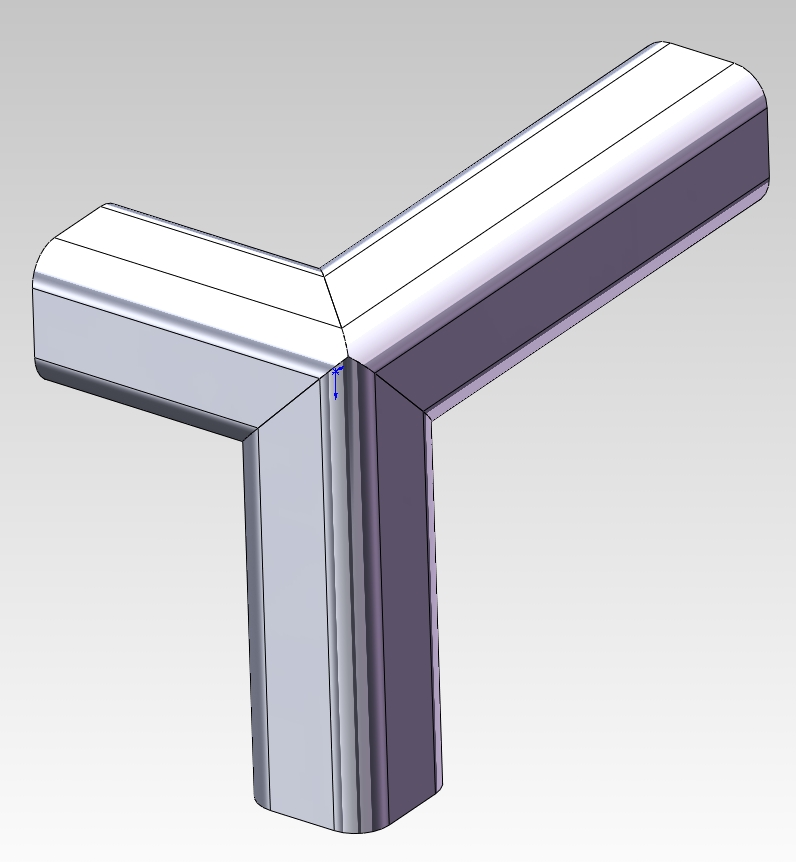
I had an inquiry this morning regarding the Certified SolidWorks Professional (CSWP) exam for Weldments. The question was, “Am working thru the practice exam and cannot get the 3 miter corner to come out. Any hints on how you did it?” I went digging to find the files I used for the practice exam and found the original model with a nice 3 member miter in it. After playing with it for a few minutes I finally rediscovered how it works. The solution is not obvious so here is the trick to pulling it off.
First, the 3 members must be made using one “Structural Member” feature in SolidWorks. This means that you cannot use any weldment profiles that have undercut features such as the 80/20 profiles that I have posted here. Build your structure using multiple Groups (SolidWorks will not allow 3 members in one Group to meet at a corner so you will need at least 2 Groups). While still editing the “Structural Member”, click the magic pink dot that represents the intersection of the 3 members in question. This brings up the Corner Treatment override tool. This is where the secret lies!
Clicking through the >> and << arrows, you can see all of the corner treatments that will be applied at this intersection. Notice the Trim Order box changes from 1 to 2, etc. as you click through the choices. The secret is to change the Trim Order for both intersections to the same number.
Notice the revealing message that pops up when you do this, “Two or more groups have the same trim order. Same trim order groups miter each other and no other end condition options are available.” The big hint is to make them the same and then they will all miter each other. For more details, you can also search the SolidWorks Help for “Weldments – Change Corner Treatment”.
Here is a sample SolidWorks file (in SW 2011 format). 3CornerMiterExample
More New 80/20 Weldment Profiles
The last time I added 80/20′s new profiles to my library, I was so excited about the new smooth fractional profiles that I skipped the metric profiles altogether. Looking back I’ve discovered the new metric profiles are truly unique as they’ve added curved sections (along with a few more LITE profiles). The presumption is that people will make interesting frame assemblies with 30°, 45° and 60° angled corners in place of the standard 90° box frame design. I love them and only wish they came in the fractional series as well. I decided to attempt a design that would highlight the unique capabilities of these profiles. C3-8020 is the result. He certainly is not traditional 80/20 frame design, but he looks very cool. You will have to pay extra to get him anodized gold, but I think it would be worth it.


I’ve uploaded all of the new profiles to 3DContentCentral as before AND I’ve placed them all in one slender zip file here. Enjoy!
CurvedProfiles (1.4Mb)
Swell Ideas
- Branding the Ball – a WordPress website
- SolidWorks Certification …Rock Star?
- Family Style Display
- SolidWorks Weldments – The 3 Member Miter
- Branding the Ball – The Word Mark
- More New 80/20 Weldment Profiles
- Customer Use Drawings
- Branding The Ball – Going Online
- New 80/20 Weldment Profiles
- Branding the Ball – The Name
Thanks for visiting!
| M | T | W | T | F | S | S |
|---|---|---|---|---|---|---|
| « Jul | ||||||
| 1 | 2 | 3 | 4 | 5 | ||
| 6 | 7 | 8 | 9 | 10 | 11 | 12 |
| 13 | 14 | 15 | 16 | 17 | 18 | 19 |
| 20 | 21 | 22 | 23 | 24 | 25 | 26 |
| 27 | 28 | 29 | ||||